A simple LinkedIn prospecting trick that improved our lead quality
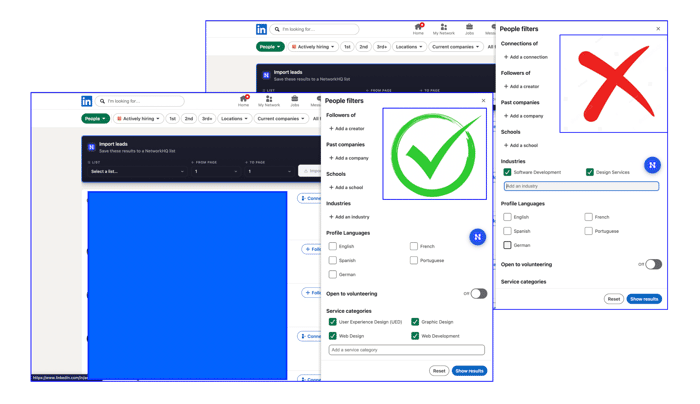
If you are trying to sell to agencies, consultants, freelancers, or service providers on LinkedIn, do this:
-
Do not start with “Industries” filter in People Search (https://www.linkedin.com/search/results/people)
For example, if you sell AI UI/UX design tools to agencies, using a broad industry filter like Design Services, or Software Development often gives you noisy results.
-
Start with the “Service categories” filter instead - LinkedIn gives you far more granular and numerous options there, which often makes it easier to find people based on the actual services they offer.
Search for service categories like Graphic Design, Web Design, Web Development, or User Experience Design (UED).
That gets you closer to people who actually do the work your product helps with.
-
Number of LinkedIn connections you can make is scarce and it is important to find the right leads with the highest intent.
Do not prospect broad. Prospect right.
If you do LinkedIn outbound, comment with one filter or trick that has improved your lead quality
PS: We are building networkhq.io

Full disclosure: I sell in this space — Avery Lin (avrlin). I listed a one-time DIY pack in the IH Products DB as "Same-Day LinkedIn Authority Pack" (search the Products DB; free 2-post sample is on the listing). Sold via an AI assistant storefront — also disclosed.
Prospecting tricks that improve lead quality still win — but the quiet drop-off I keep seeing is after they click your profile: resume-style headline/About + thin recent posts, so a warm prospect never starts the conversation.
For founders who want the outreach habit without sounding like a bot farm: offline Markdown blanks (offer-line headline/About rewrite + a first week of lived posts you paste yourself) sit under the prospecting sprint. Boring, editable, you stay in control.
Curious whether your lead-quality lift held up more when the profile/proof layer was already specific, or mostly from the prospecting filter alone?
Full disclosure: I sell in this space — Avery Lin (avrlin). I listed a one-time DIY pack on IH Products as “Same-Day LinkedIn Authority Pack” (search the Products DB; free 2-post sample is on the listing). Sold via an AI assistant storefront — also disclosed.
Helpful add-on to the prospecting filter tip: once you’ve narrowed the right ICP, the reply rate often hinges less on another outreach tool and more on whether the profile + last week of posts look like a real peer (specific problem → proof → soft CTA) instead of a blank “open to work” shell. A same-evening offline Markdown rewrite + 5–7 editable posts beats another SaaS tab for solos who won’t buy retainers.
Not competing with prospecting workflows — different job (DIY fill-in kit vs lead filters). Curious how you’re measuring lead quality after the filter change (reply rate vs booked calls).
The service categories filter is genuinely underutilized. The industry filter on LinkedIn is basically a job-title-shaped hole where relevance goes to die.
One angle worth adding to this: for small service operators (solo consultants, boutique agencies, independents), the best signal is not just what category they are in, but whether they are currently winning new business. People actively posting about client work, sharing case studies, or mentioning recent project completions are in growth mode. That is when they are actually receptive to tools or services that help them handle more.
We target a similar persona at Coop (txtcoop.com, shared iMessage for small teams, full disclosure) and the quality difference between "works in design" vs "actively posting about client wins" is enormous in terms of response rate.
"People actively posting about client work, sharing case studies, or mentioning recent project completions are in growth mode. That is when they are actually receptive to tools or services that help them handle more."
This is true - we will also implement this on our end. Thanks for the tip.
This is such a good tip, the switch from “industry” to “service categories” is honestly underrated. Makes a big difference in getting the right people instead of just more people.
I’m actually building a tool called AutoSales, it automates outbound emails but keeps them highly personalized (not the usual spray-and-pray templates), so deliverability and reply rates are much better.
When you combine smart targeting like this with solid automation, outbound just works a lot better 👍
How many mails do you send per month and how many inboxes do you maintain?
I’ve just connected with you on LinkedIn, feel free to accept so we can chat more there
Right now I keep it around ~300 emails/day per sender to stay safe on deliverability.
Usually spread across multiple inboxes depending on the campaign.
Solid technique — service-categories is so underrated for filtering. The difference between industry buckets and what someone actually does is massive for intent signal quality. Bookmarking this.
The service-categories angle holds up on the sell-side too. I do a small amount of outbound for a consulting side gig and was getting crushed by "Financial Services" as an industry filter. Swapping to service categories like "Financial Analysis" and "Business Consulting" cut the list from around 8,000 people to about 900, and the ones who replied actually had scope over the problem I was pitching.
The other filter that moved the needle for me was "Services offered on LinkedIn" set to the specific service bucket. It biases toward people who have actually turned on paid services, so they are already mentally in sell/buy mode rather than posting thought pieces.
"The other filter that moved the needle for me was "Services offered on LinkedIn" "
Where is this filter? Unable to find it on my premium account - am i missing some thing?
Can you take me through the process here if it's not a problem?
This is exactly what I needed to hear right now. I sell to fitness coaches and personal trainers, and I have been using the "Health, Wellness & Fitness" industry filter which is absurdly broad. Getting gym owners, supplement brands, yoga instructors, physiotherapists all mixed in.
Going to try Service Categories like "Personal Training" and "Fitness Coaching" tomorrow. That should cut the noise significantly.
The comment about LinkedIn DMs landing in Message Requests is real too. I have been getting maybe a 5 percent response rate on cold DMs. Might try the multi-channel approach where LinkedIn is just the first touch and follow up via email.
When you say Linkedin DMs landing in message requests - is this for people that you're already connected to? or are you talking about InMail?
Great tip, any help is welcome. All the best with the tool!
Thank you.
Great tip! I also found that filtering by keywords in headline like 'Founder' or 'Freelancer' helps narrow down high-intent prospects
Are there any other tricks or methods you've used which you could share with us?
whenever i need leads i always stays narrow and second i checkout their activeness and last one their tagline can it match which i required
But how are you able to check their activeness at scale - unless you use sales navigator?
yes ,you are right about sale navigator is required for that work
Thats an interesting strategy it simple and efficient.
Never thought about it that way I've focused more on Reddit for prospecting
Reddit is solid. You should give Linkedin a shot too.
Broad filters usually look good on paper but bring a lot of noise.
One thing that helped me was combining service categories with specific keywords in the headline or about section. It narrows it down to people who not only offer the service, but actively position themselves around it.
Are there any other hacks that you know which can help people?
Starting with service categories instead of industries is such a simple shift, but it makes a lot of sense — way closer to actual intent. Curious if you’ve tested combining that with recent activity (like people posting about that service) for even higher signal.
We have and it has worked for us. We'll slowly release that as part of what are building too. Proper intent based - 24*7 keyword monitoring. Thanks for this - gives us a lot of confidence in the direction we are headed.
Different angle that worked this week for a niche B2B (mine's a WordPress performance plugin): skip the top-level filters entirely — go directly to the target company's LinkedIn page → People tab → search by role keyword.
Found 10 relevant hosting devrels in ~15 min, near zero noise.
Service categories going into my rotation though — hadn't thought of it.
Does this approach work at scale too? or for finding your first X number of customers?
Honestly, works best for the first ~50-100 customers in a niche B2B where the target-company TAM is small. For me: WordPress hosting = Kinsta, WPE, Cloudways, Hostinger, Pantheon, SiteGround — maybe 10 companies total.
Once you've drilled through each of their People tabs, you've harvested that vein. Scale-up probably means flipping to broader filters once concentrated targets are exhausted.
Haven't hit that ceiling yet though — still in harvest phase. You?
Can you take me through process here?
So you go to "Hostinger" Linkedin page -> then the people tab -> search for relevant people
But these would be Hostinger's employees, right?
So is that going to help? or am I missing something here?
Fair pushback — you're right that People tab shows employees, not customers. I conflated two plays in my comment, my bad.
For niche B2B, hosting advocates aren't my customers — but each has an audience of thousands of WP site owners they help. One warm intro from a hosting advocate = reach into their entire customer base. That's partnership/amplifier targeting, not prospecting.
For direct customers I'd use broader search too — "WordPress agency" + 2nd connection filter etc. Two different plays.
So People tab works when you're targeting amplifiers (people with an audience of your customers), not prospects themselves.
ah fair enough. You're talking about partnerships or the profresssional services way.
Good insight. The Service Categories filter is a much sharper signal than Industries — it tells you what someone actually does, not what LinkedIn's algorithm categorized them as.
One thing I'd add: even after you find the right person, LinkedIn's messaging architecture works against you. DMs to people outside your network land in Message Requests, which most people never check. So the filter gets you to the right lead, but the message might never be seen.
I've started thinking of the LinkedIn DM as the first touch, not the conversion. It plants the seed. The follow-up through a different channel is what actually starts the conversation.
Yes - multichannel outreach like you mentioned is great.
On the messaging architecture - you could always send a new connection request with a solid note - so it will be visible to them as soon as they open their notifications or requests tab - Am I missing something here?
Good point. Service Categories are way more actionable than broad “Industry” filters.
Something to add: combine them with “Open to work / Providing services” + keywords in the headline (like freelance, agency, studio) to increase intent.
Also, check who is actively posting about that service. They’re not just doing the work — they’re engaged and more likely to respond.
Less volume, more signal. That’s the edge.
This is gold. We have not tried the "Open to work + Providing services" tactic. We'll try this and let you know. Thanks for sharing.
This is a really underrated tactic. The Industry filter on LinkedIn is way too noisy for B2B outbound targeting freelancers or small agencies — you end up with companies that self-tagged "Software Development" but are actually 500-person enterprises, not the solo consultant you're trying to reach.
One thing I'd add: the Service Categories filter gets even more powerful when you combine it with the "Open to" filter (available on free accounts too). If someone has their profile set to "Open to providing services," they're actively looking for clients — which usually means they're feeling the pain of managing their pipeline, their files, their invoicing. Much higher intent than someone you just found by keyword.
Two more filters I've found useful when you're trying to reach working freelancers specifically:
"Posted content" filter — if they've posted in the last 30 days, they're active on the platform. Dead profiles are a waste of connection slots.
"Languages" — critical if you're doing outbound in LATAM or Europe where language-market fit matters.
Quick question back: when you do outbound after finding the right lead, do you open with the service they offer or with the pain they probably have? I've seen both work but curious what's pulled better for you.
Thanks for this. We have not tried the "Open to work + Providing services" tactic - 1st thing on my to do list when I am prospecting today.
But "Posted content" is not a premium feature that most of the folks use.
I do sequences -
So I push the guess work message to second in the sequence.
that makes a lot of sense :)
The People Search + keyword + title combo is what changed our cold outreach completely. Industries filter is too broad. It returns 10K profiles that match "Marketing" when you actually need 50 profiles that match "Shopify brand owner doing 7 figures with performance issues." We layer it with current company size and past role keywords. The hit rate triples. Curious what your best performing keyword combos have been for agency buyers specifically. Titles vary wildly in agency world.
Gosh. There are too many keyword combos 😅
Have not tracked which combinations of the above three filters work - will try do it.
That’s a solid filter shift — going from “industry” to “service” is a big difference in intent.
One thing I’ve seen though:
even with better targeting, a lot of outreach still underperforms because the profile itself doesn’t fully support the message.
If the positioning or first impression feels slightly off, even high-intent leads hesitate.
Curious if you noticed that too — like targeting improved the pool, but conversion still depended heavily on how “clear and credible” things looked on your side?
Rightly said. Positioning or first impression matters beyond just getting good leads into the top of the funnel
Further, even if the leads are good, we’ve learned that’s still not enough.
You also need to:
a. Position the product or service properly - like you mentioned
Your messaging cannot stop at the outbound message. Your website, LinkedIn page, and outreach all need to speak the same language.
b. Do some prior research on likely pain points
A little context goes a long way. There’s actually a useful hack for this, which I’ll share separately.
c. Reach them at the right point in their journey
This is one of the hardest parts. Even a strong offer can fall flat if the timing is off.
d. Be persistent and follow up
A lot of people give up after sending one message. That’s a mistake. Follow-ups are where a lot of replies actually come from.
That hack point got me thinking —
Feels like most “pain point research” is reactive (after talking to leads), but the real leverage is predicting it from signals before outreach.
Things like:
– what they recently shipped
– hiring signals
– shifts in messaging
Those usually expose the real pain way faster than generic personas.
Curious if your approach is closer to that, or more based on direct conversations?
#1 and #3 are not straightforward from the filters - there are other ways around it.
But "hiring signals" are something to definitely bank on.
We've not been to figure "shifts in messaging" - any idea how to do that?
Yeah — it’s a bit indirect, but a few things work:
– homepage/landing page changes over time (even small wording tweaks)
– new taglines or headline shifts in recent posts
– how they describe the product in different places (site vs LinkedIn vs outbound)
When those don’t match, it usually means they’re still figuring positioning.
That’s also where conversion tends to drop — because the story isn’t consistent yet.
Curious if you’ve seen that too — where inconsistency shows up before conversion drops?
Interesting. No, we haven't tracked so granularly for changes over time.
Makes sense — that “inconsistency = positioning gap” point is interesting.
Now that you mention it, I’ve seen cases where the product stays the same, but just tightening that layer (name + headline + positioning) changes how people respond almost immediately.
Feels like people decide “trust vs doubt” before they even fully process the offer.
Curious if you’ve seen improvements just from fixing that layer, without changing the product itself?
This comment was deleted 5 months ago
Good point. Broad filters usually create the illusion of precision, but the results are still noisy. What helped me most is narrowing by the actual service offered and then sanity-checking for recency / relevance, because a “fit” lead is not always an active or high-intent lead.
How are you doing the sanity check for recency/relevance? I understand for few leads, but when the list is huge - what do you do?
Service categories filter is underrated — way cleaner intent than industries.
You should test this in a live competition. $19 entry, winner gets a Tokyo trip (flights + hotel).
Round 01 just opened (100 cap) — best odds right now.”
Hahaha - yes, we should.
Our customers now vouch for this simple playbook now.
Haha that’s even better — makes this a strong fit already.
Let’s plug you in for this round and get you in front of early-stage builders.
Want me to share a quick breakdown of how it works?
Sure. Please share.
“Awesome — here’s the direct link to enter:
tokyolore.com
Takes 2–3 mins max.
Since Round 01 just started, you’re getting in at the best possible odds.”
industries filter is for people who enjoy suffering. spent weeks wondering why everyone i was reaching out to was either a fortune 500 recruiter or someone who hasn't logged in since 2019
lol. it's worse on sales nav - the priciest tier on linkedin yet the 'Industries' filter's results are all dud.
The best filter is the filter for intent. Check out IbexAI (www.getibex.com), it monitors LinkedIn and finds a daily stream of prospects that signal interest in your service.
This is cool :)
Glad you like it :)
This comment was deleted 3 months ago
That's great to hear. Thank you.
This comment was deleted 5 months ago